SEO Tools & Software
SEO Tools & Software
How to Track Traffic from ChatGPT in Google Analytics
How to Track Traffic from ChatGPT in Google Analytics
Learn how to track traffic from ChatGPT and other AI platforms in GA4. This guide shows how to identify AI-driven visits, measure engagement, & understand the real impact of AI search on your website.

Ashish Kamathi, SEO Expert

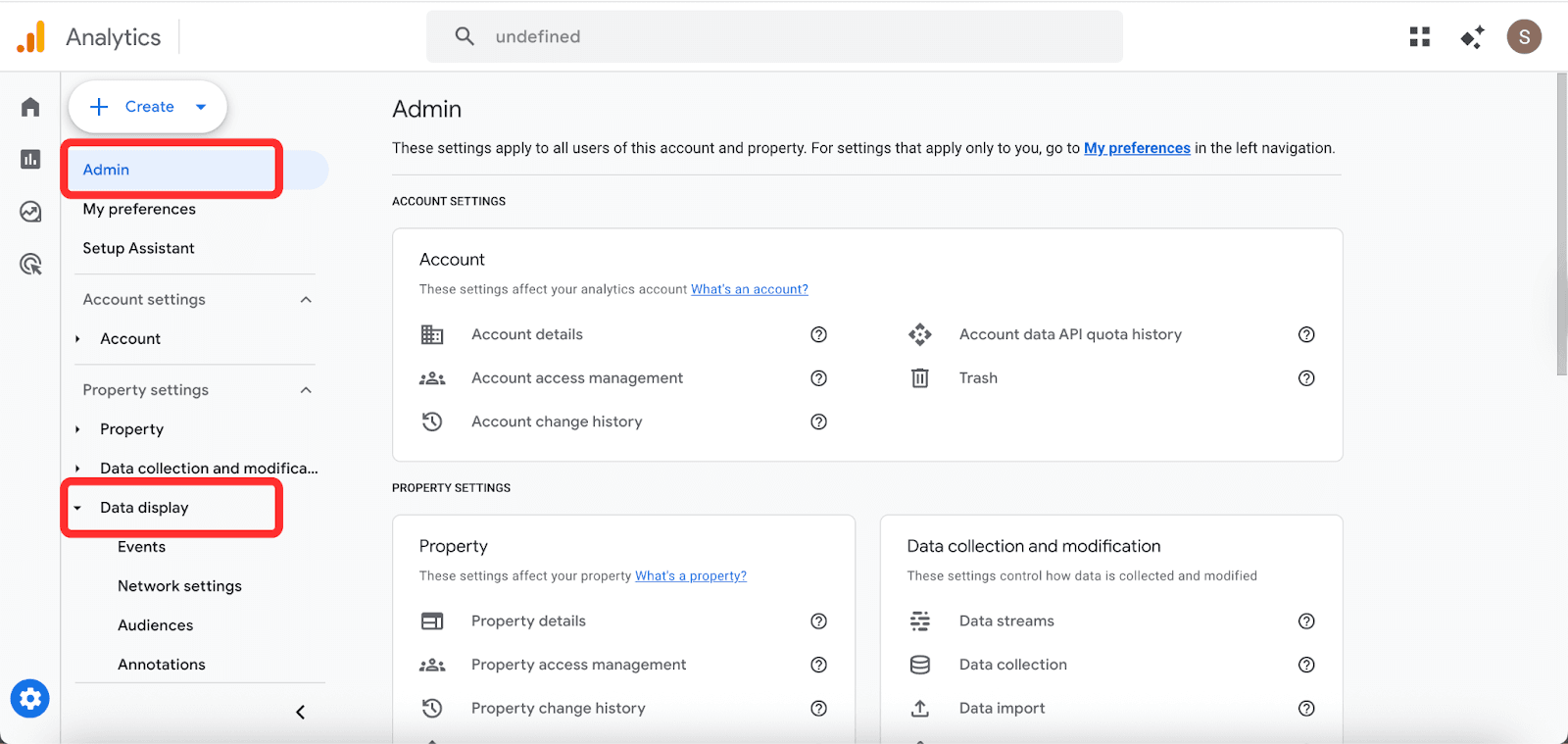
To track ChatGPT traffic in GA4, go to Admin > Data Display > Channel Groups and click Create new channel group. Name it, then click Add new channel, name it "AI Traffic", and look for the Channel conditions section that appears in the panel. Set the first dropdown to Session source, the match type to matches regex, and paste chatgpt\.com|chat\.openai\.com|openai\.com into the value field. Drag the channel above Referral and save. GA4 applies this retroactively, so your acquisition reports will immediately show ChatGPT as a distinct traffic source.
Why You Are Probably Misreading Your Traffic Right Now
ChatGPT is sending traffic to your website. GA4 is not telling you about it.
When a user clicks a link in a ChatGPT response, GA4 logs that visit under Referral, alongside blog mentions and press coverage. When a user copies the URL and opens it in a new tab, GA4 records it as Direct. In both cases, the ChatGPT referral is invisible.
The scale of what you are missing is growing fast. According to Conductor's analysis of 13,770 domains and 3.3 billion sessions, ChatGPT alone accounts for 87.4% of all AI referral traffic across 10 major industries.
At the same time, Similarweb's December 2025 report found that AI platforms collectively generated over 1.1 billion referral visits in June 2025, a 357% increase year-over-year.
That growth is accelerating: ChatGPT referrals grew 52% year-over-year between September and November 2025, while Gemini grew 388% in the same period.
The traffic quality also makes this worth measuring. Adobe's analysis of Black Friday 2025 found that visitors from AI chatbots were 38% more likely to purchase than visitors from other traffic sources. These are not casual browsers. They arrive pre-qualified.
Despite all of this, AI traffic still represents only around 1% of overall web traffic across most industries, according to Conductor. That number will compound. The brands measuring it now will have a baseline, a trend line, and an optimisation head start. The brands ignoring it will not.
The fix lives inside GA4 and takes under ten minutes.
What GA4 Captures and What It Misses
GA4 reliably captures any visit where ChatGPT passes a referrer header, meaning the user clicked a link directly from chatgpt.com or chat.openai.com . GA4 logs these as Referral traffic from those domains.
GA4 cannot capture visits where no referrer is passed. This is the larger category. It includes users who copy-paste a URL, users switching apps on mobile, and any session where the referrer is stripped. These land as Direct with no recoverable signal.
What this means in practice: the setup below accurately captures referral-passing visits. Your Direct bucket will always contain some uncredited AI traffic. What GA4 shows you after this configuration is a floor, not a ceiling. Your actual ChatGPT-driven traffic is higher than any GA4 report shows.
Method 1: Check If ChatGPT Is Already Sending You Traffic (2 Minutes)
Run this before building anything.
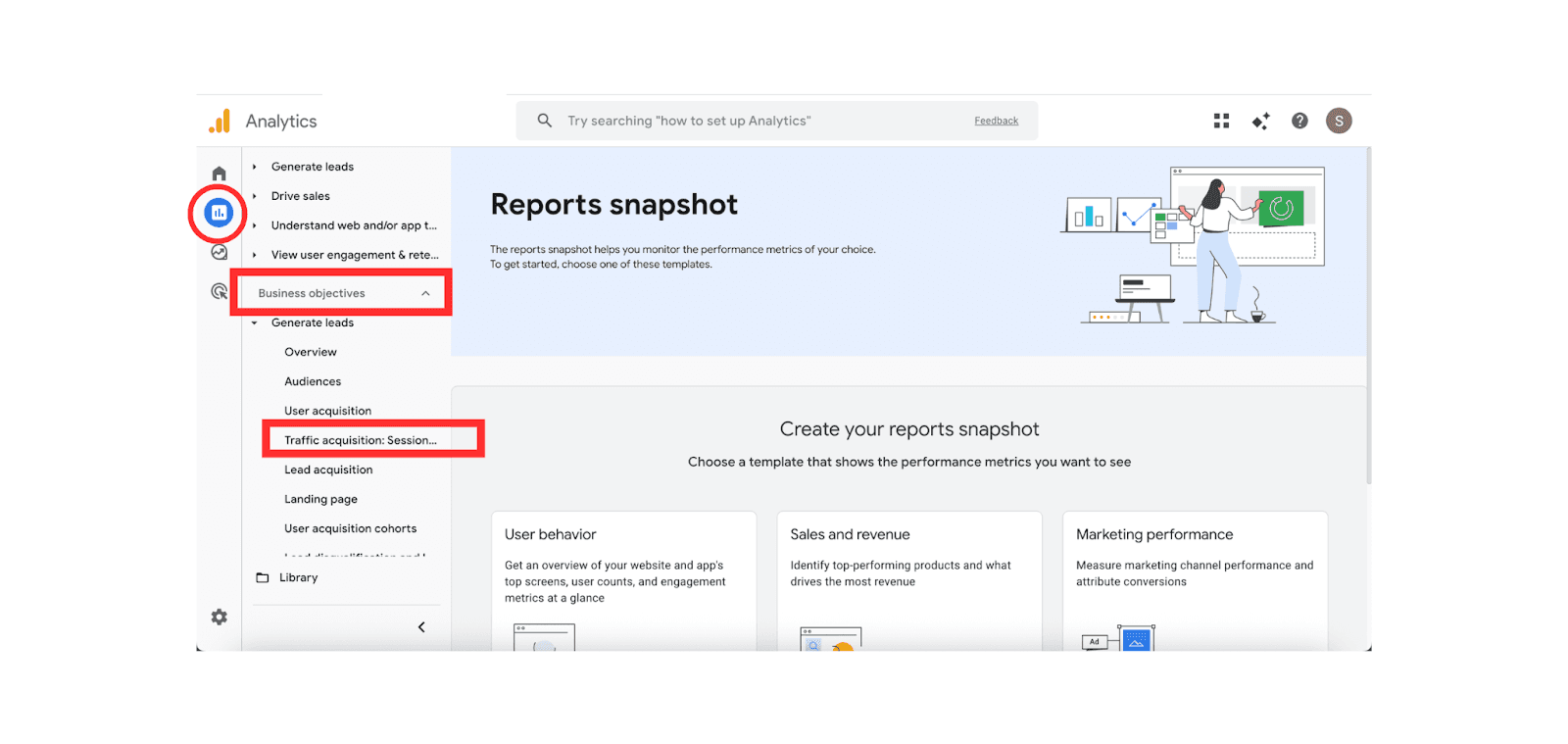
Go to Reports > Business objectives > Generate leads > Traffic acquisition. In the Session source / medium dimension, search for chatgpt.com/referral or chat.openai.com/referral. If you find nothing, extend the date range to 90 days and look again.
If you find entries, note the session counts. That is your baseline. If you find nothing, it does not mean ChatGPT is not sending traffic. It likely means those visits are landing as Direct. Either way, proceed to Method 2.
Method 2: Create a Custom Channel Group for AI Traffic (10 Minutes)
This is the core setup.
Step 1. In GA4, click Admin at the bottom left. Under the Data Display column, click Channel Groups. Do not edit the default group. Click Create new channel group.
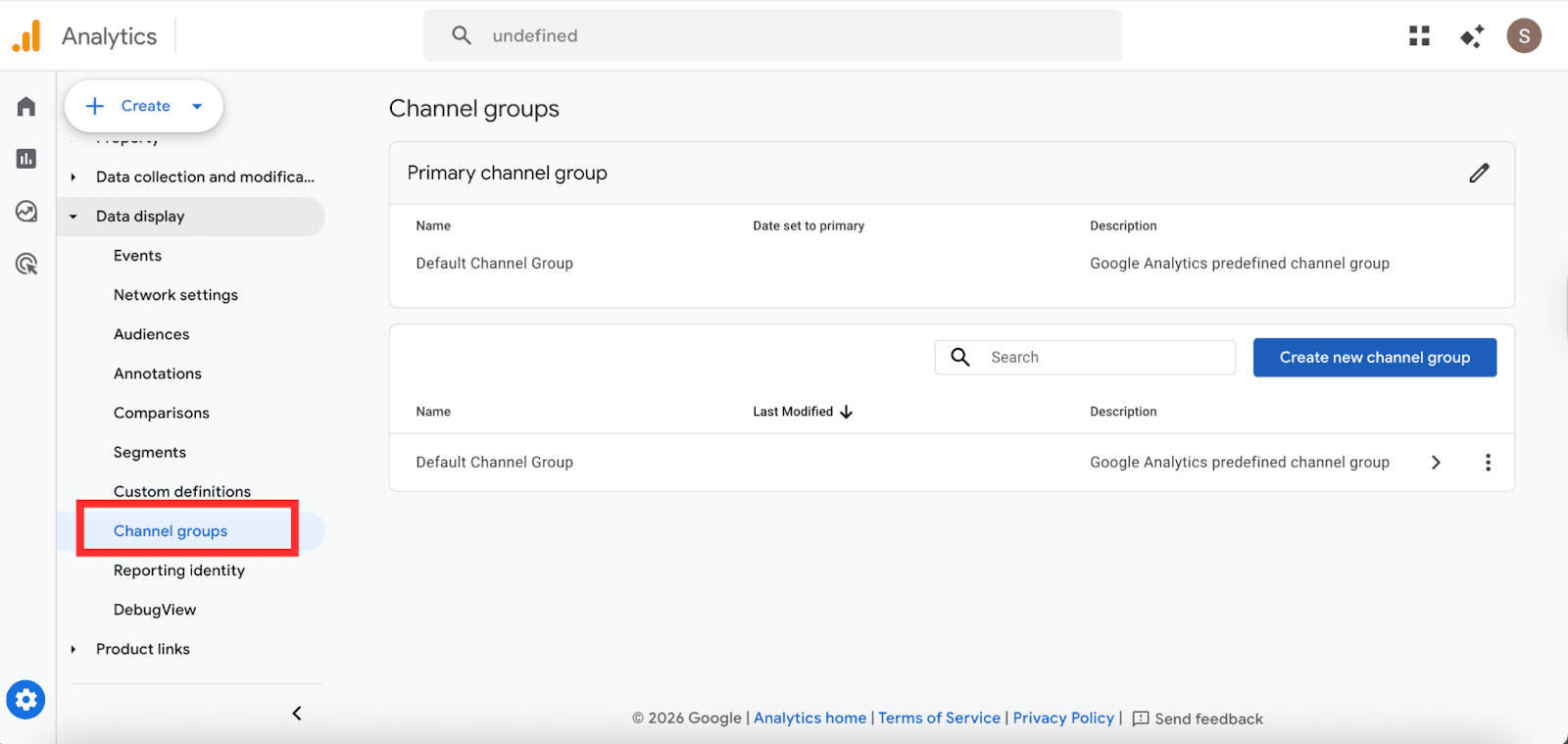
Step 2. Name it AI Traffic Sources.
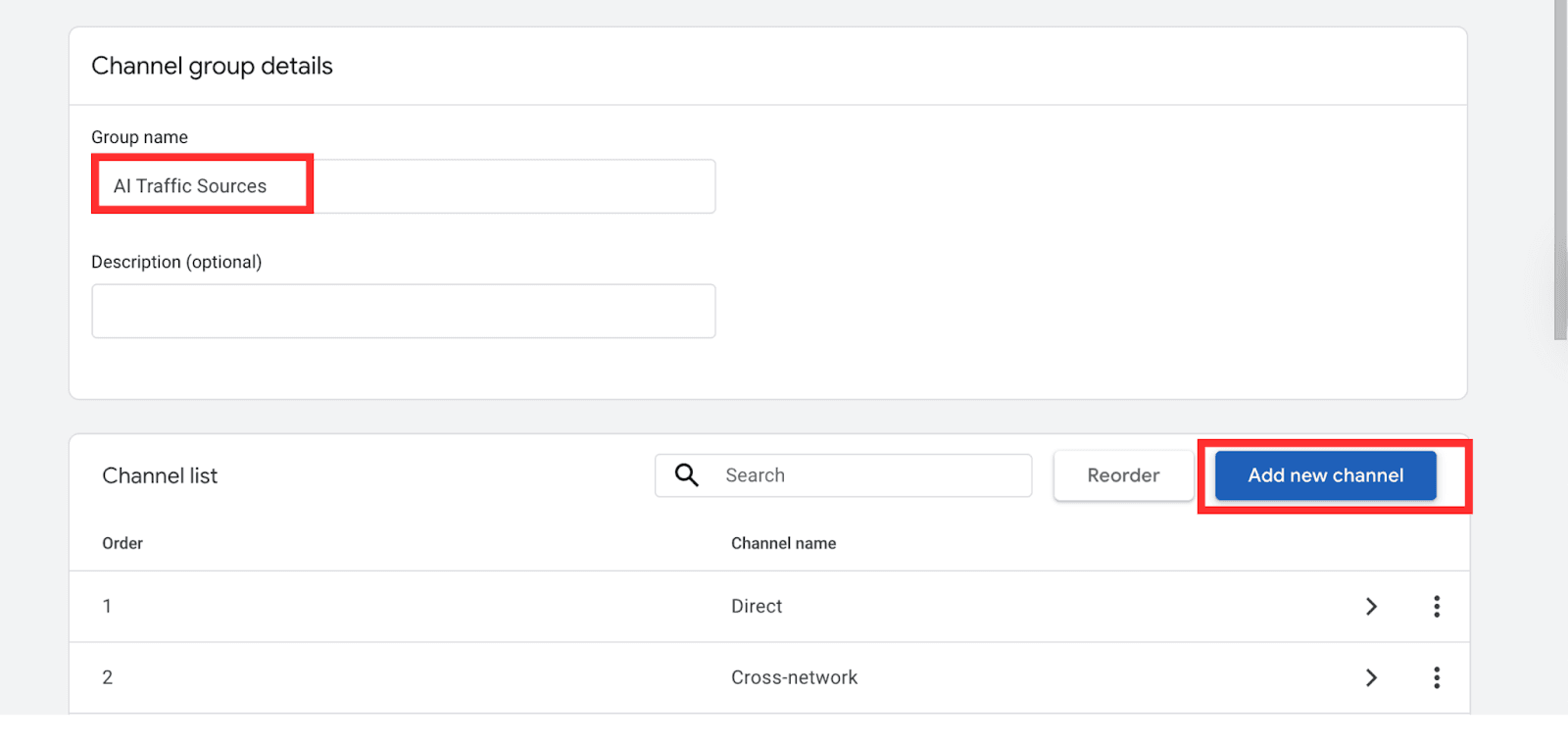
Step 3. Click Add new channel. Name it ChatGPT. Set the rule as:
Dimension: Session source
Match type: matches regex
Value: chatgpt\.com|chat\.openai\.com|openai\.com
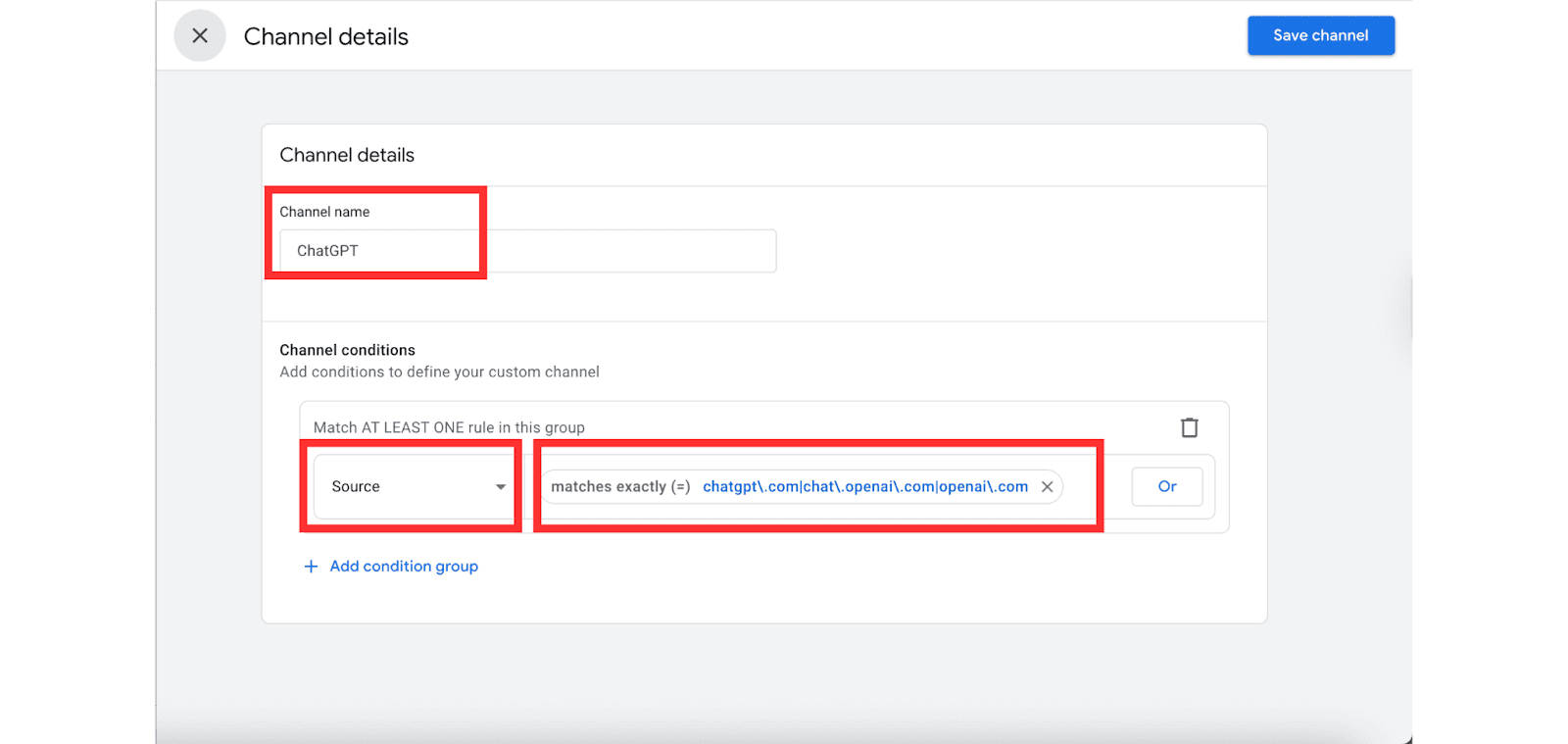
Step 4. Add channels for the other major AI referrers while you are here:
Channel Name | Regex Value |
Perplexity | perplexity\.ai |
Google Gemini | gemini\.google\.com |
Bing Copilot | copilot\.microsoft\.com |
Claude | claude\.ai |
Step 5. Drag the ChatGPT channel above the default Referral channel. GA4 assigns channels in order. If ChatGPT sits below Referral, some visits will be classified as Referral before the AI rule fires.
Step 6. Save. GA4 applies custom channel groups retroactively, so your historical data updates immediately.
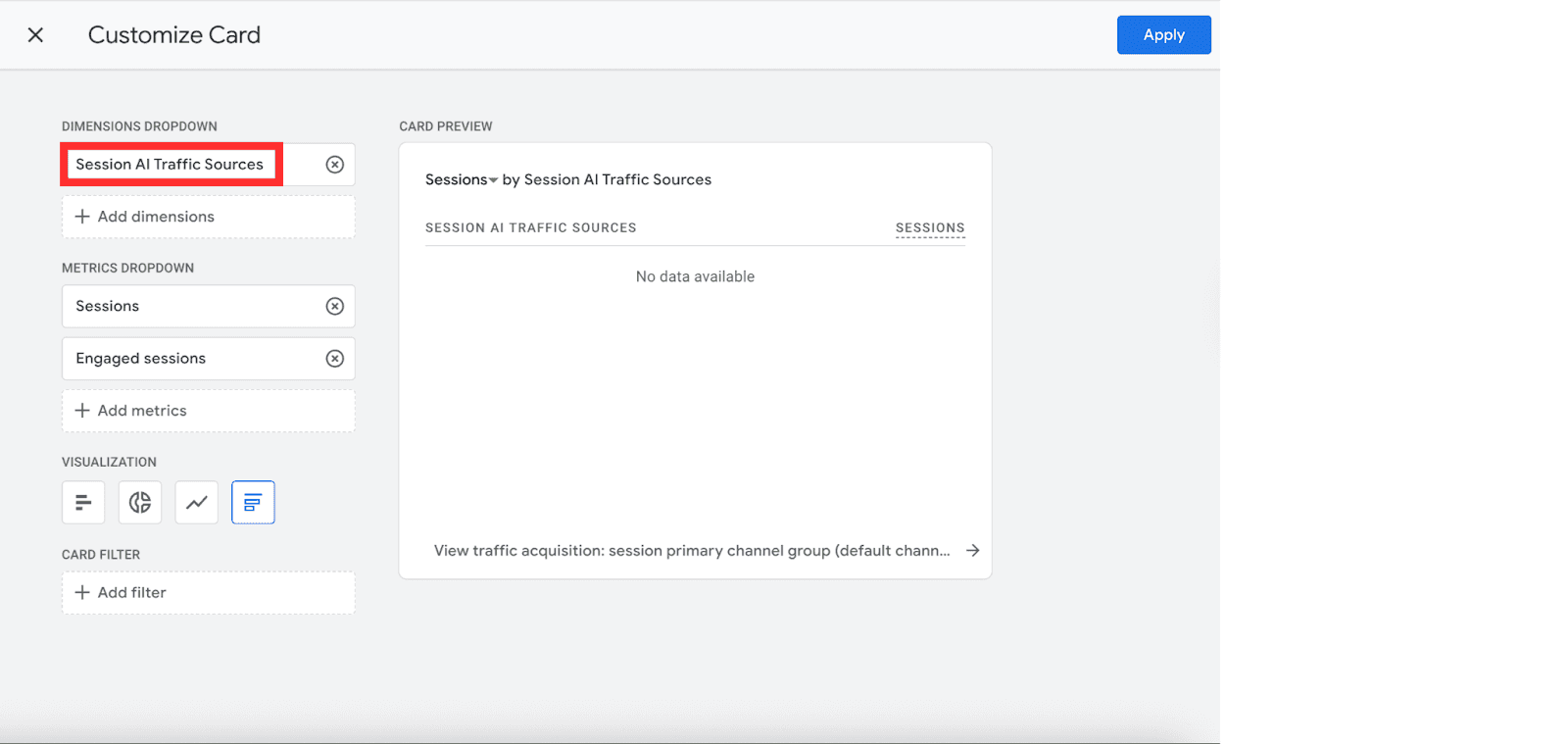
To view results, go to Reports > Business objectives > Generate leads > Traffic acquisition, click the Customize report on the top right, go to summary cards > Edits, and switch to AI Traffic Sources.
Method 3: Build a Dedicated AI Traffic Report (5 Minutes)
Switching channel groups inside the Traffic Acquisition report every time is friction. Build a permanent Exploration report instead.
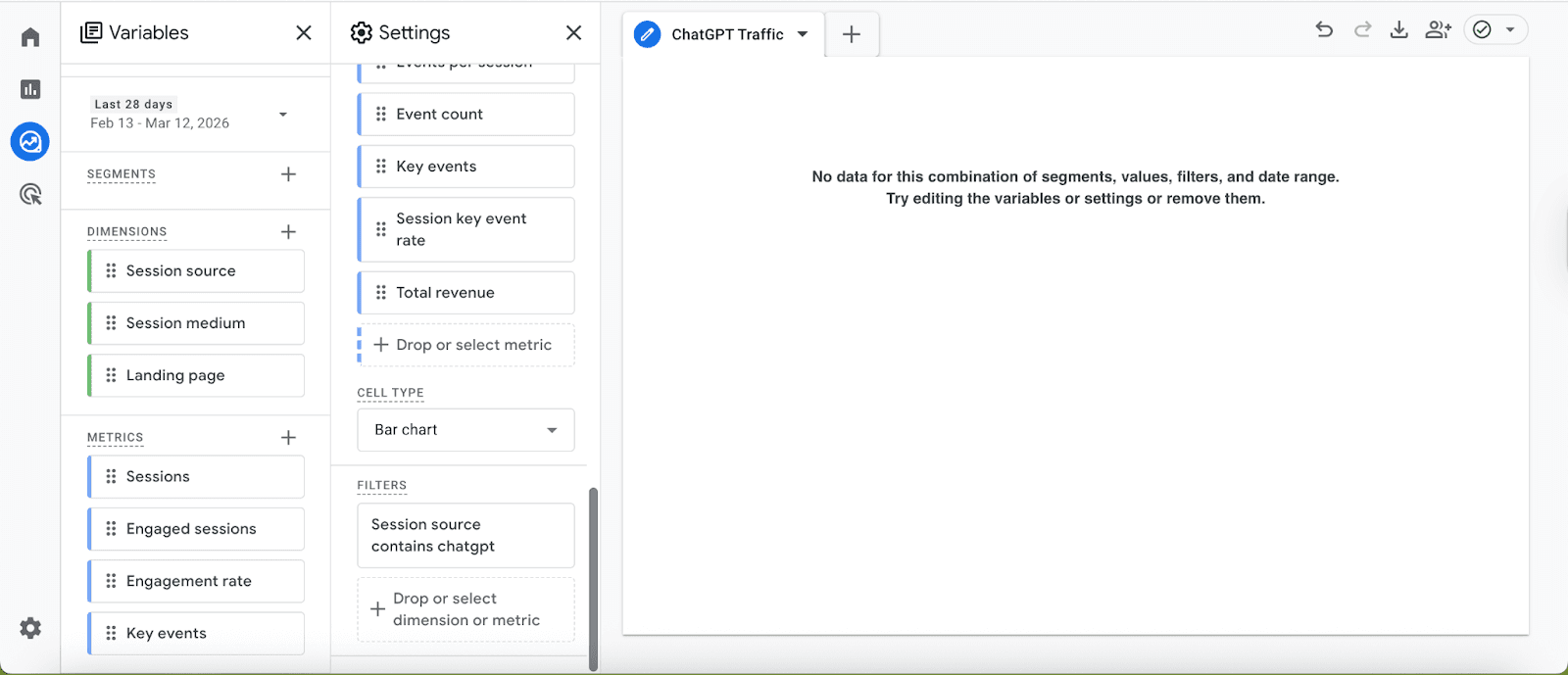
Go to Explore > Blank. Add these dimensions: Session source, Session medium, Landing page.
Add these metrics: Sessions, Engaged sessions, Engagement rate, and key events.
Add a filter: Session source > contains > chatgpt. Name it ChatGPT Traffic Monitor and save.
This report shows which pages ChatGPT sends users to, how engaged they are, and whether they convert. The landing page column is the most useful. It tells you exactly which of your pages AI models are already citing.
Reading the Data: What to Actually Measure
Once the channel group is live, these are the four numbers that matter:
Metric | What It Tells You |
Sessions from ChatGPT | Volume of tracked AI referral traffic |
Engagement rate vs site average | Whether AI-referred users are high or low intent |
Top landing pages | Which content does ChatGPT cite most often |
Month-over-month change | Whether your GEO efforts are compounding |
One thing worth knowing: AI-referred sessions tend to outperform organic search sessions on engagement rate. Users arriving from a ChatGPT citation have already been told your content is relevant to their query. They arrive pre-qualified.
The Measurement Gap Most Marketers Miss
Once you can see ChatGPT traffic, the instinct is to optimize for session volume. This is the wrong primary metric.
The more important number is the ratio of AI referral sessions to AI-generated mentions of your brand. GA4 gives you the sessions. Dedicated LLM tracking tools give you the mention count. If ChatGPT mentions your brand 500 times in a month but only sends 40 sessions to your site, the gap is not a GA4 problem. It is a content and citation problem. ChatGPT is referencing your brand without linking to it. That is a GEO optimization issue, and it requires a different fix.
GA4 alone gives you half the picture. The session data shows what was converted. The mention data shows what was lost.
WareIQ's head of marketing found exactly this gap after moving to a full AI visibility setup with Vryse. Seeing both traffic and citation data together allowed the team to identify which content gaps were costing them qualified leads. The result was a 400% increase in marketing-qualified leads.
What to Do After the Setup
Once you can see the number, the next question is how to grow it.
The pages ChatGPT cites most often share common features: a direct answer in the opening paragraph, named sources, specific outcomes, and a clear structure. If your top ChatGPT-referred pages share these traits, you have a template. Replicate it across the rest of your site.
For a full framework on optimizing content to appear in AI-generated answers, the AI-SEO optimization guide covers content structure, schema markup, and entity optimization in detail.
For brands that want to track AI visibility beyond what GA4 can show, including mention frequency across ChatGPT, Perplexity, Gemini, and others, Vryse's AI visibility dashboard surfaces your brand's presence across all major LLMs alongside competitor share-of-voice and content gap data. Book a consult to see how it works against your current setup.
To track ChatGPT traffic in GA4, go to Admin > Data Display > Channel Groups and click Create new channel group. Name it, then click Add new channel, name it "AI Traffic", and look for the Channel conditions section that appears in the panel. Set the first dropdown to Session source, the match type to matches regex, and paste chatgpt\.com|chat\.openai\.com|openai\.com into the value field. Drag the channel above Referral and save. GA4 applies this retroactively, so your acquisition reports will immediately show ChatGPT as a distinct traffic source.
Why You Are Probably Misreading Your Traffic Right Now
ChatGPT is sending traffic to your website. GA4 is not telling you about it.
When a user clicks a link in a ChatGPT response, GA4 logs that visit under Referral, alongside blog mentions and press coverage. When a user copies the URL and opens it in a new tab, GA4 records it as Direct. In both cases, the ChatGPT referral is invisible.
The scale of what you are missing is growing fast. According to Conductor's analysis of 13,770 domains and 3.3 billion sessions, ChatGPT alone accounts for 87.4% of all AI referral traffic across 10 major industries.
At the same time, Similarweb's December 2025 report found that AI platforms collectively generated over 1.1 billion referral visits in June 2025, a 357% increase year-over-year.
That growth is accelerating: ChatGPT referrals grew 52% year-over-year between September and November 2025, while Gemini grew 388% in the same period.
The traffic quality also makes this worth measuring. Adobe's analysis of Black Friday 2025 found that visitors from AI chatbots were 38% more likely to purchase than visitors from other traffic sources. These are not casual browsers. They arrive pre-qualified.
Despite all of this, AI traffic still represents only around 1% of overall web traffic across most industries, according to Conductor. That number will compound. The brands measuring it now will have a baseline, a trend line, and an optimisation head start. The brands ignoring it will not.
The fix lives inside GA4 and takes under ten minutes.
What GA4 Captures and What It Misses
GA4 reliably captures any visit where ChatGPT passes a referrer header, meaning the user clicked a link directly from chatgpt.com or chat.openai.com . GA4 logs these as Referral traffic from those domains.
GA4 cannot capture visits where no referrer is passed. This is the larger category. It includes users who copy-paste a URL, users switching apps on mobile, and any session where the referrer is stripped. These land as Direct with no recoverable signal.
What this means in practice: the setup below accurately captures referral-passing visits. Your Direct bucket will always contain some uncredited AI traffic. What GA4 shows you after this configuration is a floor, not a ceiling. Your actual ChatGPT-driven traffic is higher than any GA4 report shows.
Method 1: Check If ChatGPT Is Already Sending You Traffic (2 Minutes)
Run this before building anything.
Go to Reports > Business objectives > Generate leads > Traffic acquisition. In the Session source / medium dimension, search for chatgpt.com/referral or chat.openai.com/referral. If you find nothing, extend the date range to 90 days and look again.
If you find entries, note the session counts. That is your baseline. If you find nothing, it does not mean ChatGPT is not sending traffic. It likely means those visits are landing as Direct. Either way, proceed to Method 2.
Method 2: Create a Custom Channel Group for AI Traffic (10 Minutes)
This is the core setup.
Step 1. In GA4, click Admin at the bottom left. Under the Data Display column, click Channel Groups. Do not edit the default group. Click Create new channel group.
Step 2. Name it AI Traffic Sources.
Step 3. Click Add new channel. Name it ChatGPT. Set the rule as:
Dimension: Session source
Match type: matches regex
Value: chatgpt\.com|chat\.openai\.com|openai\.com
Step 4. Add channels for the other major AI referrers while you are here:
Channel Name | Regex Value |
Perplexity | perplexity\.ai |
Google Gemini | gemini\.google\.com |
Bing Copilot | copilot\.microsoft\.com |
Claude | claude\.ai |
Step 5. Drag the ChatGPT channel above the default Referral channel. GA4 assigns channels in order. If ChatGPT sits below Referral, some visits will be classified as Referral before the AI rule fires.
Step 6. Save. GA4 applies custom channel groups retroactively, so your historical data updates immediately.
To view results, go to Reports > Business objectives > Generate leads > Traffic acquisition, click the Customize report on the top right, go to summary cards > Edits, and switch to AI Traffic Sources.
Method 3: Build a Dedicated AI Traffic Report (5 Minutes)
Switching channel groups inside the Traffic Acquisition report every time is friction. Build a permanent Exploration report instead.
Go to Explore > Blank. Add these dimensions: Session source, Session medium, Landing page.
Add these metrics: Sessions, Engaged sessions, Engagement rate, and key events.
Add a filter: Session source > contains > chatgpt. Name it ChatGPT Traffic Monitor and save.
This report shows which pages ChatGPT sends users to, how engaged they are, and whether they convert. The landing page column is the most useful. It tells you exactly which of your pages AI models are already citing.
Reading the Data: What to Actually Measure
Once the channel group is live, these are the four numbers that matter:
Metric | What It Tells You |
Sessions from ChatGPT | Volume of tracked AI referral traffic |
Engagement rate vs site average | Whether AI-referred users are high or low intent |
Top landing pages | Which content does ChatGPT cite most often |
Month-over-month change | Whether your GEO efforts are compounding |
One thing worth knowing: AI-referred sessions tend to outperform organic search sessions on engagement rate. Users arriving from a ChatGPT citation have already been told your content is relevant to their query. They arrive pre-qualified.
The Measurement Gap Most Marketers Miss
Once you can see ChatGPT traffic, the instinct is to optimize for session volume. This is the wrong primary metric.
The more important number is the ratio of AI referral sessions to AI-generated mentions of your brand. GA4 gives you the sessions. Dedicated LLM tracking tools give you the mention count. If ChatGPT mentions your brand 500 times in a month but only sends 40 sessions to your site, the gap is not a GA4 problem. It is a content and citation problem. ChatGPT is referencing your brand without linking to it. That is a GEO optimization issue, and it requires a different fix.
GA4 alone gives you half the picture. The session data shows what was converted. The mention data shows what was lost.
WareIQ's head of marketing found exactly this gap after moving to a full AI visibility setup with Vryse. Seeing both traffic and citation data together allowed the team to identify which content gaps were costing them qualified leads. The result was a 400% increase in marketing-qualified leads.
What to Do After the Setup
Once you can see the number, the next question is how to grow it.
The pages ChatGPT cites most often share common features: a direct answer in the opening paragraph, named sources, specific outcomes, and a clear structure. If your top ChatGPT-referred pages share these traits, you have a template. Replicate it across the rest of your site.
For a full framework on optimizing content to appear in AI-generated answers, the AI-SEO optimization guide covers content structure, schema markup, and entity optimization in detail.
For brands that want to track AI visibility beyond what GA4 can show, including mention frequency across ChatGPT, Perplexity, Gemini, and others, Vryse's AI visibility dashboard surfaces your brand's presence across all major LLMs alongside competitor share-of-voice and content gap data. Book a consult to see how it works against your current setup.
Frequently Asked Questions
Frequently Asked Questions
Does GA4 track ChatGPT traffic automatically?
Partially. GA4 logs direct clicks from chatgpt.com as Referral traffic, but does not separate them from other referral sources. A custom channel group is required to surface them clearly.
How do I see traffic from AI in GA4 beyond ChatGPT?
Use the same custom channel group and add regex rules for Perplexity, Gemini, Copilot, and Claude. Each becomes its own labelled channel in your acquisition reports.
Why is my ChatGPT traffic lower than expected?
GA4 only captures sessions where a referrer header is passed. Copy-paste visits arrive as Direct and cannot be recovered. What GA4 shows is a minimum count, not a total.
How is this different from tracking organic search traffic?
In traditional SEO, you measure keyword rankings and organic click-through rates. With AI traffic, you measure citation frequency and the quality of referral sessions. A page can rank on page one in Google and never appear in a ChatGPT response. They require different measurement approaches and different optimisation levers.
Related Articles
Related Articles
How to Add Social Media to Google Search Console and Track Their Performance
Learn how Google Search Console handles social media, what platform properties can track, and how to measure social performance alongside your website's organic search data.

Shraddha Thuwal
Domain Migration Checklist: A Step-by-Step Guide to Protect Rankings and Traffic
A successful domain migration requires careful SEO planning. Follow this checklist to manage redirects, preserve rankings, protect traffic, and avoid common migration issues.
Shraddha Thuwal
Content Decay: How to Find and Refresh Declining Pages
Content decay can reduce rankings, traffic, and AI visibility over time. Learn how to find declining pages, identify causes, and refresh content with proven SEO strategies.
Shraddha Thuwal
How to Add Social Media to Google Search Console and Track Their Performance
Learn how Google Search Console handles social media, what platform properties can track, and how to measure social performance alongside your website's organic search data.
Shraddha Thuwal
Domain Migration Checklist: A Step-by-Step Guide to Protect Rankings and Traffic
A successful domain migration requires careful SEO planning. Follow this checklist to manage redirects, preserve rankings, protect traffic, and avoid common migration issues.
Shraddha Thuwal
Get Visibility, Everywhere



























Just drop us your email and we’ll reach out
Get Visibility, Everywhere
Just drop us your email and we’ll reach out
Get Visibility, Everywhere
Just drop us your email and we’ll reach out
Our weekly newsletter contains insights from strategies we use for our clients. We don’t spam.
Copyright © 2026 Vryse
Our weekly newsletter contains insights from strategies we use for our clients. We don’t spam.
Copyright © 2026 Vryse