Technical SEO
Technical SEO
7 Best Structured Data Testing Tools to Validate Schema Markup
7 Best Structured Data Testing Tools to Validate Schema Markup
Validate schema markup with structured data testing tools. Compare free and paid options to find errors, check rich result eligibility, and help search engines understand your website content.

Shraddha Thuwal
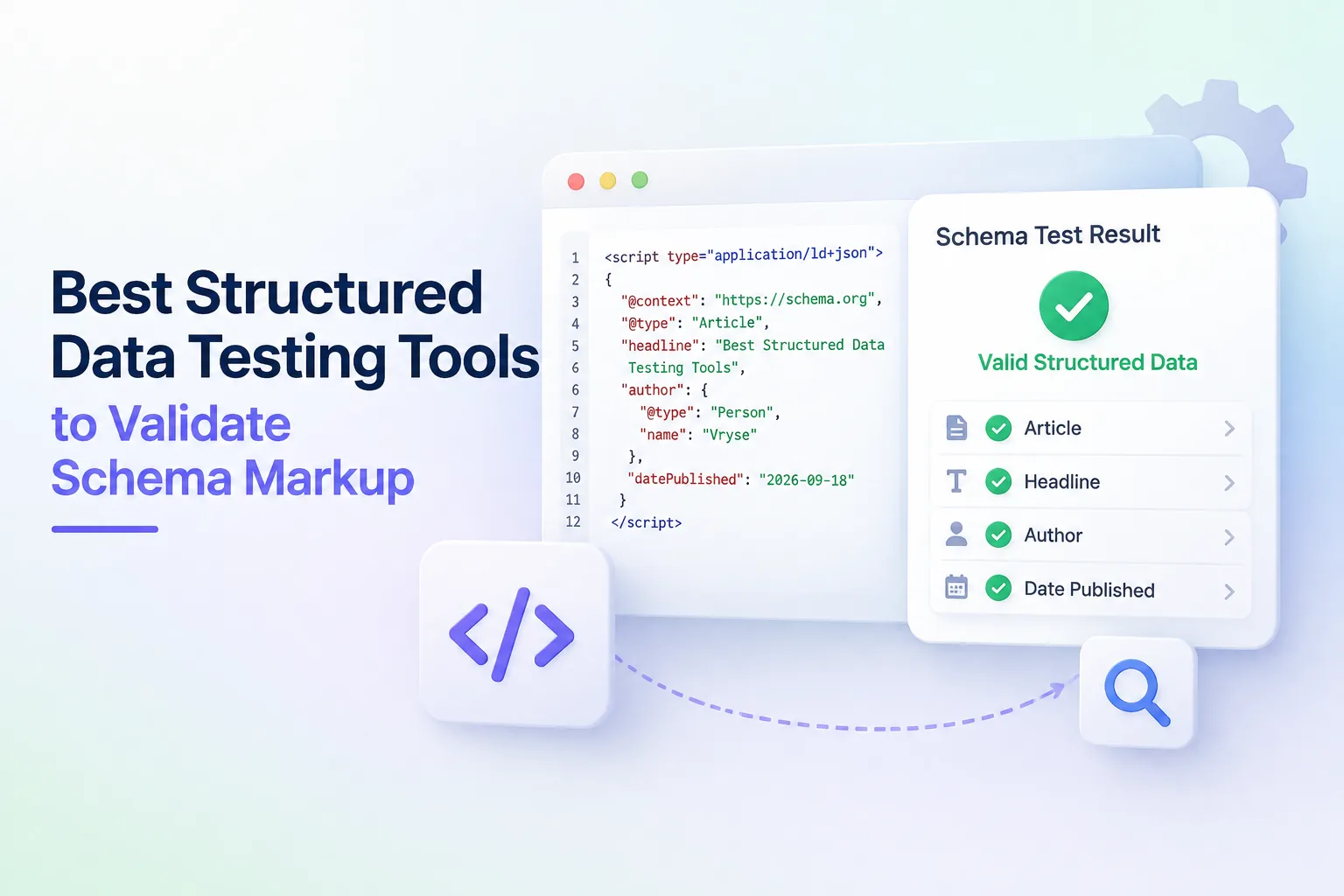
A structured data testing tool checks whether your schema markup follows Schema.org standards and whether search engines and AI systems can read it correctly. The seven picks below cover browser-based checks, Google and Bing's own validators, site-wide crawlers, and raw JSON-LD debugging, so you can pick the right one for a single page or an entire site.
Key Takeaways
A good testing tool answers two separate questions: is the markup valid, and does it qualify for rich results or AI citations?
Google retired its original Structured Data Testing Tool. Rich Results Test and Schema Markup Validator replaced it, and each does a different job.
Browser extensions work best for quick, page-by-page checks during development.
Crawler tools like Screaming Frog validate schema across an entire site at once, which matters for catching errors before they scale.
Schema markup increasingly affects AI search visibility, not just rich snippets, which is why Vryse built a checker into its own toolset.
What A Structured Data Testing Tool Actually Checks
A structured data testing tool validates two distinct things, and most people conflate them.
Schema.org compliance checks whether your markup uses recognised types and properties, correctly formatted values, and valid nesting. This applies regardless of which search engine or AI system reads it.
Rich result eligibility checks whether your markup meets a specific platform's requirements for showing enhanced results. Google can reject markup that is technically valid Schema.org code if it does not meet Google's own criteria for a given rich result type.
Structured data now does more than earn a star rating in search results. Schema helps AI systems parse and cite your content correctly. A schema markup checker that only tests for Google rich results will miss errors that affect how ChatGPT, Gemini, or Perplexity interpret your pages.
Vryse Fast Schema Markup Checker
Vryse's Fast Schema Markup Checker is a free Chrome extension built for developers and SEOs who need instant answers, not a full crawl.
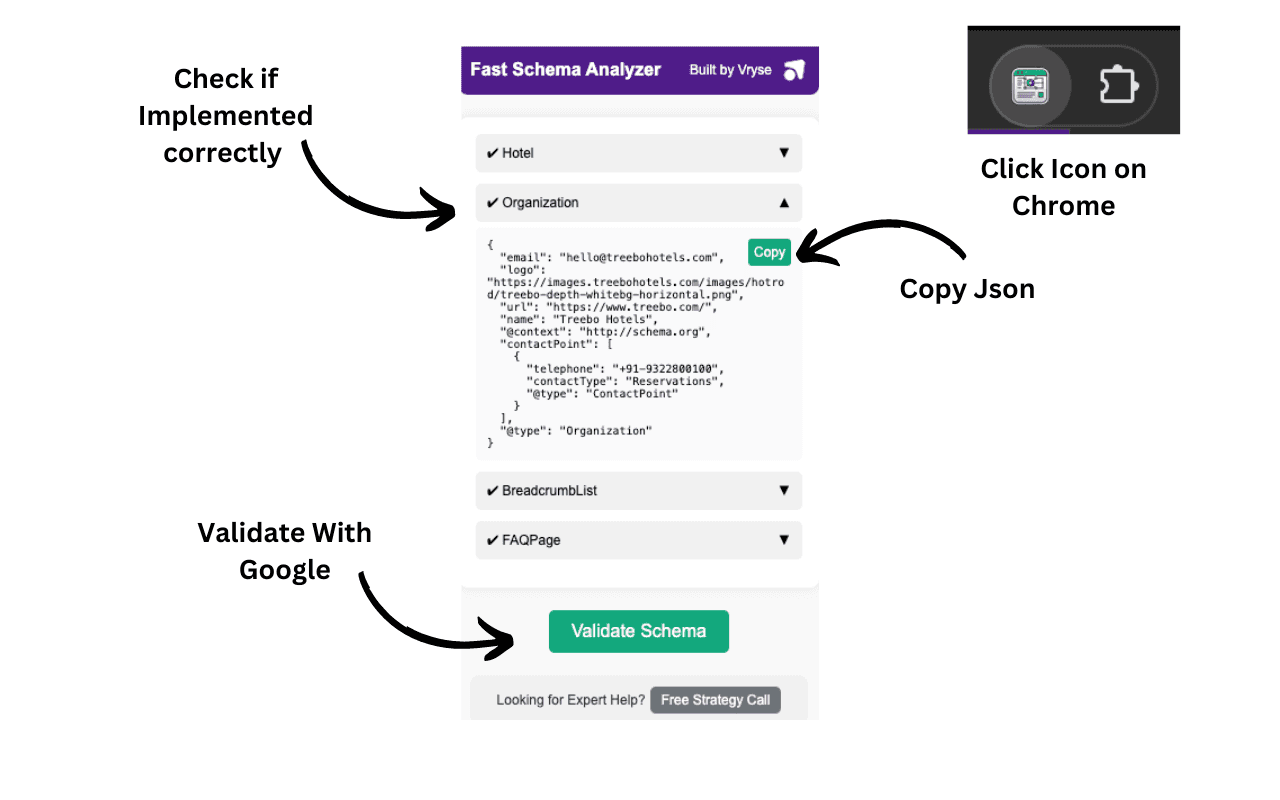
What it does: Analyses any live webpage in one click and shows whether schema markup exists, what type it is, and how the JSON-LD is structured. It works directly in the browser, so you don't need to view page source or copy code into a separate validator.
Best for: Quick spot-checks during development, competitor research, and verifying that a page's schema deployed correctly right after publishing.
Limitation: It checks one page at a time. For site-wide audits, pair it with a crawler further down this list.
Google Rich Results Test
Google's Rich Results Test is the standard schema markup testing tool for confirming whether a page qualifies for enhanced search features.
What it does: Accepts a live URL or pasted code and checks your markup against roughly 30 rich result types Google supports, including FAQ, Product, Review, and Event schema. It flags errors that block eligibility and warnings for optional improvements.
Best for: Confirming eligibility for a specific rich result before or after publishing.
Limitation: It only validates against Google's supported rich result types, not the full Schema.org vocabulary. A page can pass Schema.org validation and still fail this test if the schema type is not on Google's supported list.
Schema Markup Validator
The Schema Markup Validator, hosted by Schema.org, replaced the generic validation Google used to run inside its old Structured Data Testing Tool.
What it does: Validates all Schema. org-based structured data without checking for Google-specific rich result eligibility. It supports JSON-LD, Microdata, and RDFa formats and shows the full property hierarchy for each schema type detected.
Best for: Debugging structure, nesting, and syntax issues before running a platform-specific eligibility check.
Limitation: Passing this validator does not mean a page qualifies for Google rich results. Use it alongside Rich Results Test, not instead of it.
Google Search Console
Google Search Console's Enhancements report is not a one-off validator, but it is the only way to monitor schema at scale over time.
What it does: Tracks valid and invalid structured data items across your entire indexed site, grouped by type. It flags new errors as Google recrawls pages, which catches regressions a one-time test would miss.
Best for: Ongoing monitoring after a schema rollout, especially on sites with hundreds of templated pages where one code change can break markup sitewide.
Limitation: It only reports on pages Google has already crawled, so newly published pages will not show up immediately.
Bing Webmaster Tools Markup Validator
Bing's Markup Validator sits inside the URL Inspection tool in Bing Webmaster Tools and checks markup the way Bing's crawler reads it.
What it does: Scans a verified URL and displays the markup types detected, including Schema.org, Microdata, RDFa, and Open Graph, along with the individual properties and values found. It highlights missing or incorrectly formatted fields.
Best for: Sites that draw meaningful traffic from Bing or want Copilot visibility, since Bing's AI features pull from the same markup this tool inspects.
Limitation: Requires a verified domain in Bing Webmaster Tools, so it only works on sites you already own and have set up.
Screaming Frog SEO Spider
Screaming Frog is a desktop crawler, not a single-page validator, and it is the most efficient tool for auditing an entire website at once.
What it does: Crawls a site and extracts structured data in JSON-LD, Microdata, and RDFa formats, then validates each instance against both Schema.org specifications and Google's rich result feature requirements. It exports errors and warnings directly into a spreadsheet-ready report.
Best for: Technical SEO audits on large sites, agency work across multiple client domains, and catching template-level schema errors that a manual page-by-page check would take days to find.
Limitation: Full structured data validation requires a paid licence. The free version caps crawls at 500 URLs.
JSON-LD Playground
The JSON-LD Playground is a lightweight tool built specifically for developers working with raw JSON-LD syntax rather than a live webpage.
What it does: Lets you write or paste JSON-LD code directly and see it parsed, expanded, and flattened in real time, which makes it easier to spot malformed syntax before it ever touches a live page.
Best for: Writing and debugging JSON-LD from scratch, especially custom schema combinations that a generator tool does not cover.
Limitation: It checks JSON-LD syntax, not Schema.org compliance or rich result eligibility. Treat it as a first-pass syntax check, not a full validator.
How To Choose The Right Tool
Most teams need more than one schema testing free tool, because each one answers a different question.
Publishing a single page today? Use Vryse's Fast Schema Markup Checker or Rich Results Test for an instant check.
Writing custom JSON-LD from scratch? Start in the JSON-LD Playground, then confirm compliance in the Schema Markup Validator.
Auditing a site with hundreds of pages? Run Screaming Frog once, then monitor ongoing health in Google Search Console.
Care about Bing or Copilot visibility? Add the Bing Webmaster Tools Markup Validator to your regular check.
Vryse builds schema and structured data work into every GEO engagement, because markup errors directly affect whether AI systems cite a brand accurately. Compare plans if you want this handled as part of an ongoing SEO and GEO program instead of a one-time fix.
A structured data testing tool checks whether your schema markup follows Schema.org standards and whether search engines and AI systems can read it correctly. The seven picks below cover browser-based checks, Google and Bing's own validators, site-wide crawlers, and raw JSON-LD debugging, so you can pick the right one for a single page or an entire site.
Key Takeaways
A good testing tool answers two separate questions: is the markup valid, and does it qualify for rich results or AI citations?
Google retired its original Structured Data Testing Tool. Rich Results Test and Schema Markup Validator replaced it, and each does a different job.
Browser extensions work best for quick, page-by-page checks during development.
Crawler tools like Screaming Frog validate schema across an entire site at once, which matters for catching errors before they scale.
Schema markup increasingly affects AI search visibility, not just rich snippets, which is why Vryse built a checker into its own toolset.
What A Structured Data Testing Tool Actually Checks
A structured data testing tool validates two distinct things, and most people conflate them.
Schema.org compliance checks whether your markup uses recognised types and properties, correctly formatted values, and valid nesting. This applies regardless of which search engine or AI system reads it.
Rich result eligibility checks whether your markup meets a specific platform's requirements for showing enhanced results. Google can reject markup that is technically valid Schema.org code if it does not meet Google's own criteria for a given rich result type.
Structured data now does more than earn a star rating in search results. Schema helps AI systems parse and cite your content correctly. A schema markup checker that only tests for Google rich results will miss errors that affect how ChatGPT, Gemini, or Perplexity interpret your pages.
Vryse Fast Schema Markup Checker
Vryse's Fast Schema Markup Checker is a free Chrome extension built for developers and SEOs who need instant answers, not a full crawl.
What it does: Analyses any live webpage in one click and shows whether schema markup exists, what type it is, and how the JSON-LD is structured. It works directly in the browser, so you don't need to view page source or copy code into a separate validator.
Best for: Quick spot-checks during development, competitor research, and verifying that a page's schema deployed correctly right after publishing.
Limitation: It checks one page at a time. For site-wide audits, pair it with a crawler further down this list.
Google Rich Results Test
Google's Rich Results Test is the standard schema markup testing tool for confirming whether a page qualifies for enhanced search features.
What it does: Accepts a live URL or pasted code and checks your markup against roughly 30 rich result types Google supports, including FAQ, Product, Review, and Event schema. It flags errors that block eligibility and warnings for optional improvements.
Best for: Confirming eligibility for a specific rich result before or after publishing.
Limitation: It only validates against Google's supported rich result types, not the full Schema.org vocabulary. A page can pass Schema.org validation and still fail this test if the schema type is not on Google's supported list.
Schema Markup Validator
The Schema Markup Validator, hosted by Schema.org, replaced the generic validation Google used to run inside its old Structured Data Testing Tool.
What it does: Validates all Schema. org-based structured data without checking for Google-specific rich result eligibility. It supports JSON-LD, Microdata, and RDFa formats and shows the full property hierarchy for each schema type detected.
Best for: Debugging structure, nesting, and syntax issues before running a platform-specific eligibility check.
Limitation: Passing this validator does not mean a page qualifies for Google rich results. Use it alongside Rich Results Test, not instead of it.
Google Search Console
Google Search Console's Enhancements report is not a one-off validator, but it is the only way to monitor schema at scale over time.
What it does: Tracks valid and invalid structured data items across your entire indexed site, grouped by type. It flags new errors as Google recrawls pages, which catches regressions a one-time test would miss.
Best for: Ongoing monitoring after a schema rollout, especially on sites with hundreds of templated pages where one code change can break markup sitewide.
Limitation: It only reports on pages Google has already crawled, so newly published pages will not show up immediately.
Bing Webmaster Tools Markup Validator
Bing's Markup Validator sits inside the URL Inspection tool in Bing Webmaster Tools and checks markup the way Bing's crawler reads it.
What it does: Scans a verified URL and displays the markup types detected, including Schema.org, Microdata, RDFa, and Open Graph, along with the individual properties and values found. It highlights missing or incorrectly formatted fields.
Best for: Sites that draw meaningful traffic from Bing or want Copilot visibility, since Bing's AI features pull from the same markup this tool inspects.
Limitation: Requires a verified domain in Bing Webmaster Tools, so it only works on sites you already own and have set up.
Screaming Frog SEO Spider
Screaming Frog is a desktop crawler, not a single-page validator, and it is the most efficient tool for auditing an entire website at once.
What it does: Crawls a site and extracts structured data in JSON-LD, Microdata, and RDFa formats, then validates each instance against both Schema.org specifications and Google's rich result feature requirements. It exports errors and warnings directly into a spreadsheet-ready report.
Best for: Technical SEO audits on large sites, agency work across multiple client domains, and catching template-level schema errors that a manual page-by-page check would take days to find.
Limitation: Full structured data validation requires a paid licence. The free version caps crawls at 500 URLs.
JSON-LD Playground
The JSON-LD Playground is a lightweight tool built specifically for developers working with raw JSON-LD syntax rather than a live webpage.
What it does: Lets you write or paste JSON-LD code directly and see it parsed, expanded, and flattened in real time, which makes it easier to spot malformed syntax before it ever touches a live page.
Best for: Writing and debugging JSON-LD from scratch, especially custom schema combinations that a generator tool does not cover.
Limitation: It checks JSON-LD syntax, not Schema.org compliance or rich result eligibility. Treat it as a first-pass syntax check, not a full validator.
How To Choose The Right Tool
Most teams need more than one schema testing free tool, because each one answers a different question.
Publishing a single page today? Use Vryse's Fast Schema Markup Checker or Rich Results Test for an instant check.
Writing custom JSON-LD from scratch? Start in the JSON-LD Playground, then confirm compliance in the Schema Markup Validator.
Auditing a site with hundreds of pages? Run Screaming Frog once, then monitor ongoing health in Google Search Console.
Care about Bing or Copilot visibility? Add the Bing Webmaster Tools Markup Validator to your regular check.
Vryse builds schema and structured data work into every GEO engagement, because markup errors directly affect whether AI systems cite a brand accurately. Compare plans if you want this handled as part of an ongoing SEO and GEO program instead of a one-time fix.
Frequently Asked Questions
Frequently Asked Questions
What is the best free structured data testing tool?
Google's Rich Results Test and Vryse's Fast Schema Markup Checker are both free and require no account setup. Rich Results Test is best for checking Google rich result eligibility, while Vryse's extension is faster for a quick page-level check during development.
Do I need more than one schema validation tool?
Yes, in most cases. Schema.org compliance and platform-specific rich result eligibility are separate checks. A page can pass one and fail the other, so pairing a generic validator with a platform-specific test catches more errors.
Can a structured data testing tool improve AI search visibility?
Testing tools catch errors, but fixing them improves visibility. Clean, valid schema helps AI systems like ChatGPT and Gemini parse and cite content accurately, which is a growing part of how brands appear in AI-generated answers.
How often should I re-test structured data?
Re-test after any template change, CMS update, or migration, since these are the most common causes of sitewide markup breaks. For ongoing monitoring, Google Search Console's Enhancements report flags new errors automatically between manual checks. Want schema and structured data handled as part of a full SEO and GEO strategy? Book a consult with Vryse and get your markup audited alongside your broader search visibility.
Related Articles
Related Articles
How to Track Salesforce AppExchange Rankings and Improve Your App’s Visibility
Track your AppExchange rankings, identify keyword opportunities, and optimize your Salesforce listing to improve marketplace visibility, attract qualified buyers, and drive more installs.

Ashish Kamathi, SEO Expert
How to Add Social Media to Google Search Console and Track Their Performance
Learn how Google Search Console handles social media, what platform properties can track, and how to measure social performance alongside your website's organic search data.
Shraddha Thuwal

Domain Migration Checklist: A Step-by-Step Guide to Protect Rankings and Traffic
A successful domain migration requires careful SEO planning. Follow this checklist to manage redirects, preserve rankings, protect traffic, and avoid common migration issues.
Shraddha Thuwal
How to Track Salesforce AppExchange Rankings and Improve Your App’s Visibility
Track your AppExchange rankings, identify keyword opportunities, and optimize your Salesforce listing to improve marketplace visibility, attract qualified buyers, and drive more installs.
Ashish Kamathi, SEO Expert
How to Add Social Media to Google Search Console and Track Their Performance
Learn how Google Search Console handles social media, what platform properties can track, and how to measure social performance alongside your website's organic search data.
Shraddha Thuwal
Get Visibility, Everywhere



























Just drop us your email and we’ll reach out
Get Visibility, Everywhere
Just drop us your email and we’ll reach out
Get Visibility, Everywhere
Just drop us your email and we’ll reach out
Our weekly newsletter contains insights from strategies we use for our clients. We don’t spam.
Copyright © 2026 Vryse
Our weekly newsletter contains insights from strategies we use for our clients. We don’t spam.
Copyright © 2026 Vryse